
Drawmer Manuals
Manuals
Categories

Drawmer Manuals
Overview
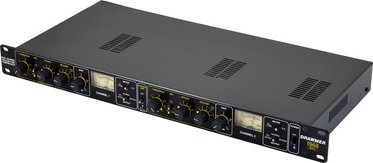
Drawmer is a renowned British manufacturer specializing in professional audio processing equipment, particularly in the realm of dynamics and signal shaping. Their product lineup includes compressors, limiters, gates, expanders, channel strips, and multiband processing units used in studios, live sound, broadcast, and post-production. Drawmer manuals are comprehensive documents that describe the operation, setup, features, technical specifications, and best-practice usage of these devices. Well-written manuals help users—from beginners to seasoned engineers—understand the principles behind each product, integrate the hardware or software into signal chains, and troubleshoot common issues.
Purpose and Audience
Drawmer manuals serve multiple purposes: they act as user guides for setup and operation, reference documents for technical specifications and signal routing, and educational resources explaining the theory behind the processing tools. The primary audience includes recording engineers, live sound technicians, broadcast engineers, studio owners, music producers, and hobbyists who use Drawmer gear. Manuals also cater to technicians who perform installation, maintenance, or servicing of the units.
Typical Structure of a Drawmer Manual
Title Page and Revision Info
Manuals usually begin with a title page that lists the product name and model number, manufacturer contact details, and sometimes a revision or edition number. Revision information is important because firmware updates, hardware revisions, or added features are often documented across releases.
Safety and Compliance
A prominent early section covers safety warnings, safe handling procedures, and regulatory compliance information (CE, FCC, RoHS, etc.). Users are advised about electrical safety, proper ventilation, correct power supplies, and grounding to avoid damage or injury.
Contents and Quick Start
Most manuals include a table of contents for easy navigation. A quick start or setup guide provides step-by-step instructions to get the unit operational—covering rack mounting, power connection, audio I/O connections, and default settings. This allows users to start using the device immediately while leaving detailed explanations for later sections.
Front-Panel and Rear-Panel Descriptions
Detailed labeled diagrams of the front and rear panels map each control, switch, button, and connector to its function. This section explains the purpose of knobs (e.g., Threshold, Ratio, Attack, Release), switches (e.g., bypass, link, sidechain), meters (VU/LED), and displays, along with the layout of inputs and outputs (XLR, TRS, DB25, RCA, ADAT, AES/EBU, word clock). Clear diagrams reduce user confusion when performing real-world connections.
Operation and Controls
This core section dives into the functionality of each control and how they interact. For dynamics processors, the manual explains the signal flow and common use cases: compression for smoothing vocals and instruments, limiting for preventing clipping, gating for removing noise between phrases, and expansion for increasing perceived dynamic range. It covers parameter ranges, behavior at extreme settings, and guidance on audible effects produced by adjustments to attack, release, knee, and ratio.
Advanced Features and Modes
Many Drawmer units offer advanced features such as sidechain filtering, stereo linking, mid/side processing, variable knee behavior, lookahead limiting, and digital I/O with sample rate handling. The manual explains how to enable and use these modes, their practical applications (e.g., de-essing with a sidechain filter or preserving low-end with sidechain high-pass), and how they affect signal path and latency.
Presets and Memory
If the device includes memory for presets or recallable settings, the manual documents how to store, recall, and manage presets. Examples of factory presets and recommended starting points for common scenarios (lead vocal, drum bus, mix bus, broadcast) help users quickly dial in useful settings.
Connectivity and Integration
A section on system integration explains how to connect Drawmer gear into studio or live environments. It discusses nominal operating levels (+4 dBu vs. -10 dBV), impedance considerations, balanced vs. unbalanced connections, conversion between analog and digital domains (if applicable), and clocking/sync procedures for digital units. This section often includes wiring diagrams and recommended signal chain placements (e.g., compressor before or after EQ).
Technical Specifications
Technical data tables provide measurable performance metrics: frequency response, THD+N (total harmonic distortion plus noise), dynamic range, input and output impedance, maximum input/output levels, noise floor, common-mode rejection, and power consumption. For digital or hybrid units, sample rate support, bit depth, latency, and I/O formats are included. These specs allow users and system designers to evaluate compatibility and expected performance.
Calibration, Maintenance, and Service
Guidance for routine maintenance, cleaning, and calibration is provided, along with recommended environmental conditions (temperature, humidity). For rack-mounted studio gear, torque and mounting tips are sometimes given. A service section explains warranty terms, typical service procedures, and how to contact Drawmer or authorized service centers for repairs or spare parts.
Troubleshooting and FAQs
A troubleshooting chapter lists common issues (no audio, excessive noise, hum, improper linking) and stepwise checks to resolve them. This practical section accelerates problem resolution and reduces support requests. Frequently asked questions address recurring user concerns such as optimal attack/release settings, how to avoid pumping artifacts, and best practices for mastering vs. tracking.
Appendices
Appendices may include block diagrams, signal flow charts, a glossary of audio terms, and references to related Drawmer products. For units with digital control or firmware, firmware update procedures, MIDI or remote control implementation details, and pinouts for connectors are included.
Writing Style and Presentation
Drawmer manuals balance technical accuracy with practical usability. Clear, concise language with labeled diagrams, step-by-step procedures, and audio examples (descriptive rather than audible) make the material accessible. Illustrations, thumbnails of front/rear panels, graphs (frequency response, attack/release curves), and example signal chains improve comprehension. Where helpful, the manual provides recommended starting points and A/B comparison suggestions to guide listening tests.
Common Topics Explained in Depth
Compression Fundamentals
Manuals typically explain why compression is used—to control dynamics, increase perceived loudness, glue elements together, or shape transients—and how parameters interact. For instance, higher ratios yield stronger gain reduction, fast attacks catch transients but can dull the sound, and slow releases preserve natural dynamics but may miss fast peaks. The knee parameter determines the transition from uncompressed to compressed signal.
Limiting and Peak Protection
Limiter sections discuss ceiling settings, lookahead behavior, and release recovery. Drawmer limiters often emphasize transparent peak control and minimizing distortion while maintaining level. Manuals describe appropriate use for mastering, loudness control, or front-of-house peak suppression.
Gating and Expansion
Gates remove low-level noise by muting signals beneath a set threshold; expanders reduce signal noise by increasing dynamic range. Manuals outline attack/release considerations to avoid abrupt gating artifacts, and explain hold times, hysteresis, and sidechain filtering for practical noise reduction tasks.
Sidechain Techniques
Sidechaining allows external signals to control compression/gating behavior. The manual shows how to duck a music bed under a voice, trigger gates with click tracks, or shape compression behavior with frequency-specific detection (e.g., de-essing by high-frequency emphasis). Sidechain filtering diagrams and routing examples clarify setup for both analog and digital implementations.
Examples and Use Cases
Practical examples illustrate common workflows: tracking a vocalist with gentle compression to control peaks, using a gate to clean up tom mics in a drum overhead, applying a stereo compressor to glue a mix bus, or using a De-Esser for sibilant control. Each example includes recommended starting parameter ranges and cues for when to alter settings.
Digital Integration and Firmware
For modern Drawmer units with digital features, manuals explain USB or Ethernet connectivity, remote control protocols, firmware update steps, and software editors. They detail how presets sync between hardware and software, recommended firmware maintenance practices, and how to troubleshoot connectivity issues.
Licensing, Warranty, and Support
Legal sections cover warranty terms, limitations of liability, and licensing information for bundled software. Contact details for technical support, links to online resources (product pages, knowledgebase), and instructions for registering products are typically provided.
Accessibility and Localization
Many Drawmer manuals are available in multiple languages and in downloadable PDF format. Accessibility considerations include clear typography, high-contrast diagrams, and logically organized content to assist quick lookup and comprehension.
Historical Context and Product Families
Drawmer has produced classic units that remain valued for sonic character (e.g., tube-based compressors, VCA designs). Manuals often reference compatible product families or recommended signal chain pairings. Vintage units may have legacy manuals still available for download, while modern units include digital enhancements and updated specifications.
How to Get the Right Manual
Always ensure the manual matches the exact model and revision of the Drawmer unit. Check model numbers, serial ranges, and firmware versions. Drawmer’s official website and authorized dealers provide the latest manuals and firmware. For legacy gear, archived manuals are often available in PDF form through manufacturer archives or reputable audio gear repositories.
Conclusion
Drawmer manuals are essential companions for users seeking to get the best performance from audio processing gear. They combine practical setup instructions, thorough operational descriptions, technical specifications, and troubleshooting guidance. A well-structured manual reduces learning curves, helps avoid equipment misuse, and empowers users to apply processors creatively and effectively across recording, mixing, live sound, and broadcast applications.
Search for 166 Manuals online


Type-in Brand or Model