
AVM FRITZ!Box 7490 Manual
PDF manual · 196 Pages
English



Ask a Question
Frequently Asked Questions
The FRITZ!Box 7490 supports DSL/VDSL (including IP-based/direct access), cable (via an external modem connected to LAN1), mobile Internet via compatible USB UMTS/HSPA modems, and can also be integrated into an existing network as a router or IP client.
Is this answer helpful?
You can connect devices using WPS by pressing the WLAN button and initiating WPS on the client, or by selecting the FRITZ!Box wireless network name and entering the network key printed on the underside. The user interface also exposes WLAN security and key settings.
Is this answer helpful?
Yes. The 7490 provides two analog FON ports, an ISDN S0 port for ISDN phones or NTBA, and supports IP telephony. It handles answering machines, fax functions, call diversion, caller blocking and registering DECT handsets or smartphones via FRITZ!App Fon.
Is this answer helpful?
FRITZ!OS updates can be installed via the Update wizard in the web interface, which checks for available versions. Automatic search for updates can be enabled to notify you of new versions. Manual updates are possible by uploading a downloaded .image file if the device has no internet access.
Is this answer helpful?
Remote access is available via MyFRITZ! (personal cloud) and by enabling HTTPS access and user accounts with permitted internet access. MyFRITZ! registers your box and maps changing public IPs so you can reach FRITZ!NAS, call lists, answering machine and the user interface remotely.
Is this answer helpful?
If you enabled the “Forgot password” push service, the FRITZ!Box can send an access link to your email to reset the password without losing settings. Otherwise, you must restore factory settings within ten minutes after a reboot and reconfigure the device.
Is this answer helpful?
Energy-saving features include Green AP mode that reduces WLAN power when idle, configurable LAN port power modes (Power or Green mode), and an energy-saving option for USB hard drives that powers them down when idle (if supported by the drive).
Is this answer helpful?
Advantages and Disadvantages
Advantages

- All-in-one device: modem, router, dual-band AC Wi‑Fi, DECT base and media server in one unit.
- Comprehensive telephony features including analog, ISDN, VoIP, answering machine and fax support.
- Advanced networking: Gigabit LAN, USB 3.0, VPN, IPv6, DNSSEC, QoS and port forwarding.
- User-friendly web interface with wizards plus standard and advanced views for different expertise levels.
- Energy-saving features: Green AP, per-LAN energy modes and USB hard drive power management.
Disadvantages

- Feature-rich UI may overwhelm novice users when advanced view is enabled.
- Manual FRITZ!OS updates require downloading and careful installation to avoid disruptions.
- Hardware is older compared to the latest Wi‑Fi 6/6E routers, limiting peak wireless throughput.
- Some advanced functions (VPN, dynamic DNS, port forwarding) require networking knowledge.
- Remote access setup (MyFRITZ!, HTTPS) requires careful configuration to maintain security.
Product Description
AVM FRITZ!Box 7490 Manual — Overview and Features
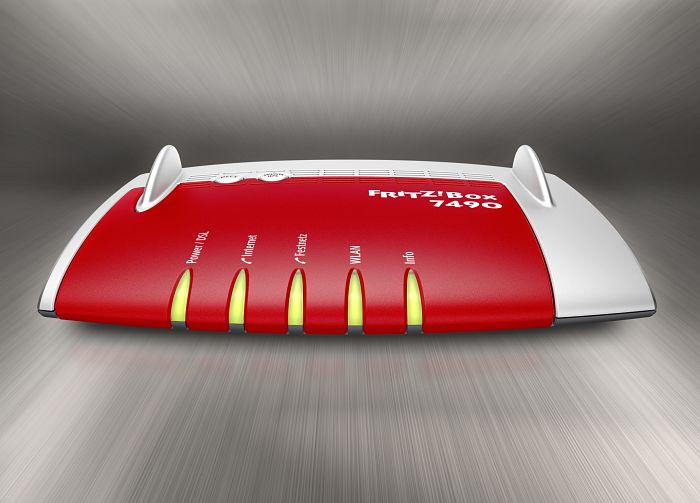
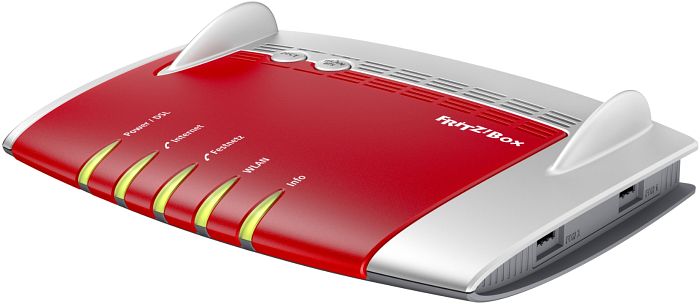
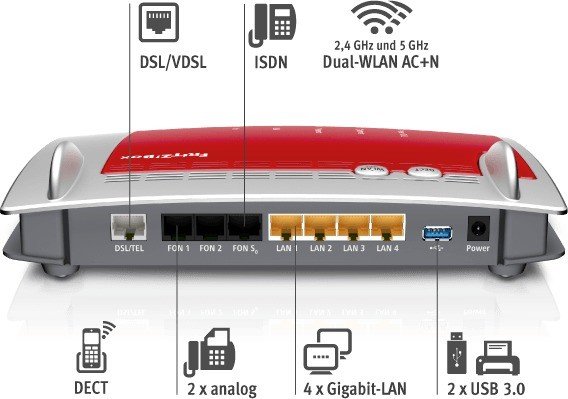
The AVM FRITZ!Box 7490 is a powerful all-in-one home networking hub designed to serve as a DSL/VDSL modem, router, wireless access point, DECT base station and multimedia server. Built for homes that demand fast wired and wireless connectivity, the 7490 supports dual-band Wi‑Fi (2.4 GHz and 5 GHz, including 802.11ac and 802.11n), four Gigabit Ethernet LAN ports, two analog FON ports, an ISDN S0 port, and two USB 3.0 ports for printers or storage. It integrates telephony features—IP telephony, landline, answering machine, fax support—and can manage up to six DECT cordless handsets as a PBX. The unit also supports FRITZ!NAS for shared storage and media streaming, and FRITZ!OS delivers frequent firmware updates, security patches and new features.
Setting up the FRITZ!Box 7490 is guided and flexible: wizards simplify internet setup for DSL, cable (via an external modem), mobile USB modems, or existing router networks. The device can operate as an independent router, an IP client, or connect over wireless LAN to another router. Security and convenience are central: FRITZ!Box users and password protection, MyFRITZ! remote access, HTTPS access, push notification services (for call logs, answering-machine messages, updates), and options for backups and restoring settings streamline management. The interface is accessible via any browser at fritz.box and offers a standard and advanced view to suit casual users and power users.
Power and energy management features include Green AP mode to reduce WLAN power when idle, per-port LAN energy modes, and power-saving options for USB hard drives. The FRITZ!Box also offers an extensive set of telephony functions—call lists, answering machine, fax-to-email, call diversion, do-not-disturb, caller blocking, and convenience dialing rules—plus FRITZ!App Fon to use smartphones as cordless handsets via WLAN. For advanced networking, the 7490 supports port forwarding, dynamic DNS, VPN, custom DNS, IPv6, DNSSEC, prioritization/QoS, and scheduled WLAN. Help and diagnostics within the user interface assist troubleshooting and updates (automatic or manual) keep FRITZ!OS current.
Compact yet comprehensive, the FRITZ!Box 7490 is suited for households wanting integrated telephony, strong wired/wireless performance, local media sharing and secure remote access. Its rich feature set is balanced by clear guides for installation, handling and safety, making it approachable for everyday users and configurable for advanced scenarios.
Notes
- Default wireless name and network key are printed on the underside of the device. Secure and change them after setup.
- Use the built-in wizards for internet, telephony and push-service setup to simplify configuration.
- Enable the "Forgot password" push service to avoid factory resets if you lose login credentials.
Search for 166 Manuals online


Type-in Brand or Model