
Behringer Neutron Manual
PDF manual · 30 Pages
English


Ask a Question
Frequently Asked Questions
The Neutron excels at hands-on analog sound design—fat basses, evolving pads, aggressive leads and experimental modular-style patches. Its semi-modular patch bay and analog delay make it ideal for studio sound design and live performance where tactile control and characterful effects matter.
Is this answer helpful?
No. The Neutron is semi-modular and fully normalized for immediate use without patch cables. The patch bay is available for advanced routing, modulation and Eurorack-style experimentation when you want to override default signal paths.
Is this answer helpful?
Connect via USB (class-compliant MIDI) or 5-pin DIN MIDI. The Neutron appears as a MIDI device in your DAW with no drivers required on modern OSes. Use the rear DIP switches to set its MIDI channel and avoid sending MIDI from both USB and DIN simultaneously to prevent conflicts.
Is this answer helpful?
Yes. Poly-chaining allows multiple Neutron units to distribute notes across units to achieve polyphonic setups. Each unit must share the same MIDI channel and poly-chain behavior is toggled via the PARAPHONIC button; chain behavior determines how extra notes are passed along.
Is this answer helpful?
You may calibrate the ASSIGN output voltage using SysEx commands and a DVM, and trim the BBD delay feedback/clock noise via internal VR pots if needed. Firmware updates use the DFU tool from the manufacturer—follow the official release notes for procedure and safety.
Is this answer helpful?
Yes—the Neutron is designed to be Eurorack-compatible and ships with an adapter cable. Eurorack installation requires removing the top panel and connecting a +12 V supply; this should be carried out by an experienced technician to avoid damage or injury.
Is this answer helpful?
Ground loops are the most common cause. Ensure all devices share a common ground, power devices from the same outlet when possible, try unplugging cables to identify the loop, or use a DI/isolation transformer to break ground connections and eliminate hum.
Is this answer helpful?
Advantages and Disadvantages
Advantages

- Rich analog signal path with dual V3340-style VCOs and 5 morphing oscillator shapes for diverse timbres.
- Semi-modular patch bay (32 in / 24 out) enables deep modulation, routing and Eurorack integration.
- Warm analog BBD delay and soft-clipping overdrive provide characterful effects and texture.
- Audio-rate LFO, blendable shapes and paraphonic mode expand creative and experimental sound design.
- Comprehensive connectivity: USB class-compliant MIDI, 5-pin DIN, audio I/O, headphone out and assignable CV output.
Disadvantages

- BBD delay can introduce clock noise and may require calibration for clean repeats.
- Semi-modular complexity has a learning curve for users new to patching and CV routing.
- Eurorack conversion requires opening the unit and handling internal connectors—best left to technicians.
- Limited built-in polyphony (monophonic/paraphonic); full polyphony needs multiple units and poly-chaining.
- Some controls (trim calibrations, assignable output) require external tools/software for precise setup.
Product Description
Behringer Neutron — Deep Dive and Getting Started Guide
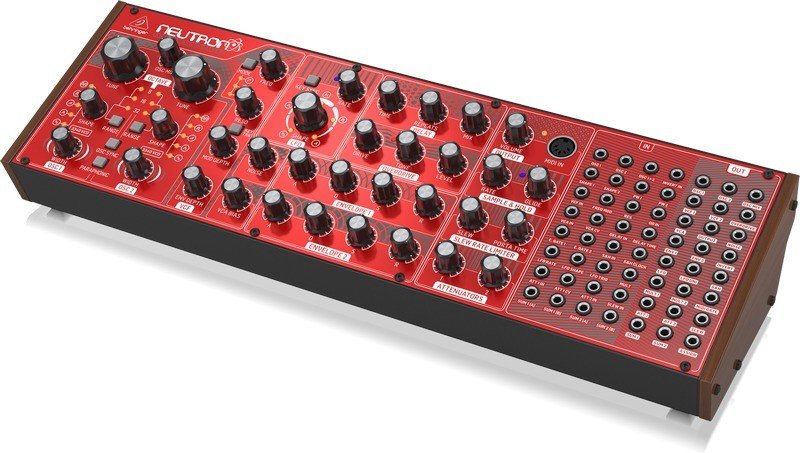
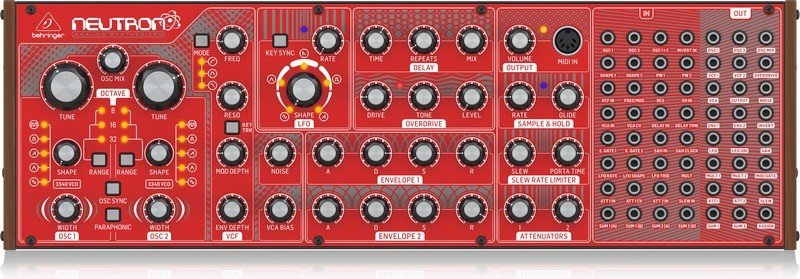
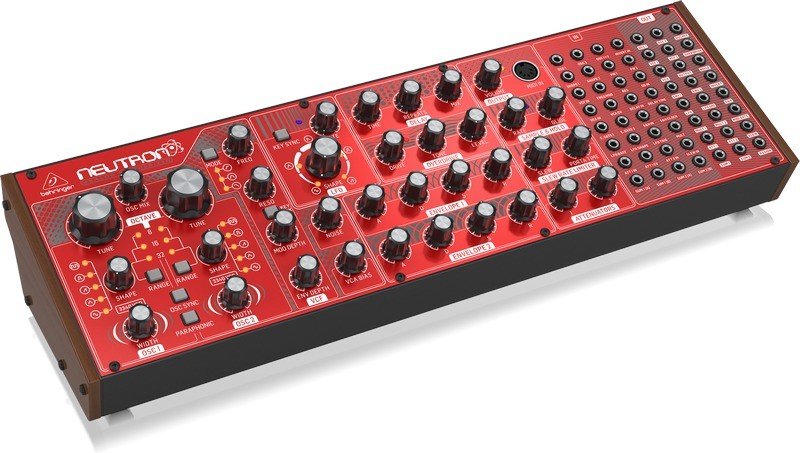
The Behringer Neutron is a hands-on, semi-modular analog synthesizer built around two V3340-style VCOs, a 12 dB multi-mode filter, dual ADSR envelopes, an analog bucket-brigade delay and an overdrive stage. Designed for immediate playability, it ships in a Eurorack-friendly format with a 32-in / 24-out patch bay that invites experimental routing while remaining fully playable without patch cables. With blendable oscillator and LFO shapes, paraphonic behavior, audio-rate LFOs and flexible modulation options, the Neutron offers a broad palette—from deep, chunky basses to screaming leads and evolving soundscapes.
The twin oscillators provide five morphing shapes (Tone Mod, Square, Saw, Triangle, Sine) and fine tune/range controls that span standard organ-style octaves up to a full +/-10-octave mode. Paraphonic mode lets the two oscillators track separate notes for rich intervals; OSC sync and pulse-width controls expand tonal possibilities. The LFO runs from very slow modulation up to audio rates, with blendable wave shapes, key sync and MIDI clock sync for tempo-coordinated modulation.
At its core the Neutron’s 12 dB filter offers low-pass, band-pass and high-pass modes with adjustable frequency, resonance and keyboard tracking; a second VCF output enables creative summing and notch-like effects via patching. Two ADSR envelopes are assignable (ENV1 defaults to VCA, ENV2 to VCF) and the sample-and-hold with glide produces classic random stepped modulation useful for sci-fi textures and sequence-like patterns.
The analog BBD delay gives warm, characterful repeats from short chorusing-style delays to long dub-style echoes; internal trims let you calibrate feedback behavior and minimize clock noise. The soft-clipping overdrive adds harmonics and grit with independent tone and level control; combined with the delay and filter it’s a potent sound-shaping stack.
Connectivity is comprehensive: audio I/O, headphone out with level control, USB MIDI class-compliant, 5-pin DIN MIDI, and an extensive patch bay exposing CV, gate, LFO, envelopes, sums, attenuators, slew and more. The assignable output can be user-configured (OSC CV, velocity, modwheel, aftertouch) and the unit supports poly-chaining multiple Neutrons for expanded polyphony. Neutron also includes user-configurable behaviors (shape blend vs switched, retriggering, tuning modes), DFU firmware updates and full Eurorack conversion instructions for experienced technicians.
Notes:
- Use the supplied 12 V DC adapter only and follow grounding and safety instructions to avoid hum/ground loops.
- The patch bay uses 3.5 mm jacks—observe voltage limits to prevent damage.
- For precise control, learn how to calibrate the ASSIGN output and BBD trims if needed.
Search for 166 Manuals online


Type-in Brand or Model