
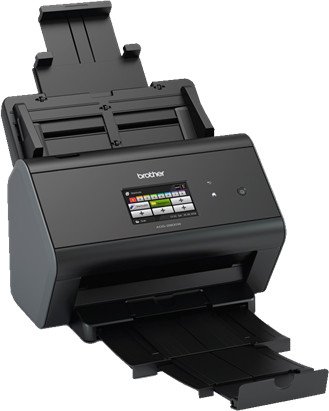

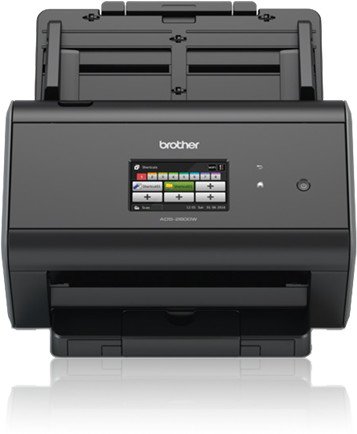
Brother ADS-2800W Manual
PDF manual · 283 Pages
English



Ask a Question
Frequently Asked Questions
The ADS-2800W supports Hi‑Speed USB, Ethernet, and Wi‑Fi connections. It enables direct scanning to PCs, network shared folders, FTP/SFTP, SharePoint, USB flash drives, and cloud services via Web Connect.
Is this answer helpful?
The automatic document feeder holds up to 50 sheets (depending on paper weight) and accepts standard sizes from A8 up to legal, with long paper support up to multiple meters when configured as Long Paper in scan settings.
Is this answer helpful?
Yes. Using Web Connect and the Web Connect Guide features, the scanner can upload directly to services like Dropbox, Google Drive, OneDrive, Box and Evernote without a computer.
Is this answer helpful?
Security includes Secure Function Lock 3.0 to restrict features by user/group, Active Directory and LDAP authentication for user validation, Setting Lock to prevent configuration changes, and administrative Web Based Management for centralized control.
Is this answer helpful?
Use the Touchscreen Shortcuts menu to add scan, Web Connect, or Apps shortcuts. Up to 48 shortcuts (8 tabs × 6 each) can be created with preset destinations, file types, resolution and other options for one-touch scanning.
Is this answer helpful?
Enable or disable Multifeed Detection in settings depending on media type. For mixed batches, align paper direction, keep weights within recommended ranges, and test samples—use carrier sheets for delicate or nonstandard documents.
Is this answer helpful?
Visit the Brother Solutions Center (support.brother.com) to download the latest drivers, firmware, user guides, Web Connect Guide, Network User’s Guide and mobile app instructions.
Is this answer helpful?
Advantages and Disadvantages
Advantages

- Versatile connectivity: USB, Ethernet, and Wi‑Fi for shared and wireless scanning.
- Robust security: Secure Function Lock, Active Directory and LDAP authentication support.
- Efficient workflow: 50‑page ADF, Auto Start Scan, and up to 48 customizable shortcuts.
- Cloud and network integration: Scan to FTP/SFTP, SharePoint, network folders and popular cloud services.
- Comprehensive software support: ControlCenter4, TWAIN/ICA, Nuance PaperPort and Brother mobile apps.
Disadvantages

- No built‑in OCR engine on the device; relies on connected apps or software for text conversion.
- Carrier sheet required for very thin or nonstandard documents, adding a handling step.
- Certain plastic or rigid cards may scratch or feed inconsistently; multifeed detection may need disabling.
- Advanced user management setup (AD/LDAP) requires administrator knowledge and configuration.
- Firmware and driver updates must be manually checked via Brother Solutions Center to maintain features.
Product Description
Brother ADS-2800W Manual — Powerful, Network-Ready Document Scanner
The Brother ADS-2800W is a business-focused desktop document scanner designed to streamline paper-to-digital workflows. Built for small offices and workgroups, it combines fast scanning speeds, flexible connectivity, and advanced document handling to reduce manual processing time and improve productivity. With a touchscreen-driven interface and robust security and network features, the ADS-2800W fits well into modern document ecosystems.
Key features and capabilities
The ADS-2800W offers a reliable automatic document feeder (ADF) that handles multi-page jobs with ease, accepts a wide range of document sizes and weights, and supports plastic cards and long documents through carrier-sheet handling. The scanner delivers consistent image quality and supports multiple file formats and resolutions, making it suitable for archiving, OCR, and electronic distribution.
Connectivity is versatile: USB and Ethernet are standard, while Wi-Fi adds wireless convenience for shared office use. The scanner integrates with PC utilities (ControlCenter4) and mobile apps (Brother iPrint&Scan) for direct scanning to computers, mobile devices, cloud services, FTP/SFTP, SharePoint, and network folders. WS Scan and Web Connect features enable scanning via web services and uploading directly to cloud platforms like Dropbox, Google Drive, OneDrive, and Box.
Security and management
Designed for networked environments, the ADS-2800W supports administrative controls such as Secure Function Lock 3.0, Active Directory and LDAP authentication, and setting lock to prevent unauthorized changes. Administrators can restrict scan functions per user or group, add card-based authentication support through NFC on higher models, and manage devices using BRAdmin utilities or web-based management.
Workflow optimization
Shortcuts and one-touch scanning simplify repetitive tasks: create up to 48 shortcuts across tabs for frequent destinations or scan settings. Auto Start Scan, multifeed detection, and automatic daylight-saving time adjustments are among features that reduce manual oversight and improve reliability. Optional carrier sheets, document separation settings, and mixed-batch handling help scan a variety of media without frequent interruptions.
Maintenance and support
The device includes guidance for routine maintenance—cleaning rollers, replacing pick-up and reverse rollers, and monitoring consumable lifecycles—to keep performance consistent. Firmware and driver updates are available through Brother Solutions Center to ensure ongoing compatibility and feature improvements.
Notes:
- Supports scanning to USB, PC, network folders, FTP/SFTP, SharePoint, email servers, and cloud services.
- Integrates with Brother ControlCenter4, Nuance PaperPort, TWAIN/ICA applications, and Brother iPrint&Scan for mobile scanning.
- Includes advanced user and network security: Secure Function Lock, Active Directory, LDAP, and administrative Web Based Management.
Overall, the Brother ADS-2800W balances speed, connectivity, and security for offices that need dependable, networked document capture and easy integration into digital workflows.
Search for 166 Manuals online


Type-in Brand or Model