
Feiyu Tech Manuals
Manuals
Categories

Feiyu Tech Manuals
Introduction
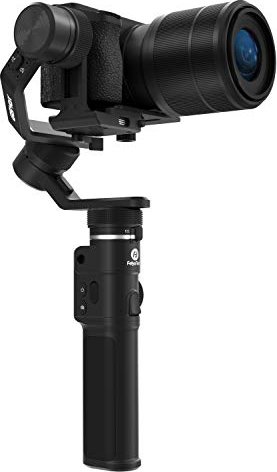
Feiyu Tech manuals are comprehensive documents designed to help users understand, operate, maintain, and troubleshoot Feiyu Tech products, which include handheld gimbals, stabilizers, camera accessories, and related electronic devices. These manuals serve as the authoritative source of information provided by the manufacturer and are crucial for both novice and experienced users seeking to get the most out of their equipment. Presented in clear sections with step-by-step instructions, diagrams, safety information, and technical specifications, Feiyu Tech manuals aim to ensure safe operation, optimal performance, and longevity of devices.
Purpose and Scope
Feiyu Tech manuals cover a wide range of topics relevant to product ownership. They typically include: device overview, component identification, setup and balancing instructions, firmware updates, operation modes and controls, battery handling and charging, maintenance and care, troubleshooting guides, specifications, warranty information, and regulatory compliance statements. The manuals are intended for photographers, videographers, content creators, hobbyists, and professionals who rely on Feiyu Tech equipment for stable, high-quality footage.
Structure and Layout
Front Matter
The front matter of Feiyu Tech manuals usually contains the product name, model number, version of the manual, release date, and contact information for customer support. A table of contents provides quick navigation to major sections and subtopics.
Safety and Compliance
Early in the manual, a dedicated safety section lists warnings, cautions, and recommendations to prevent injury or equipment damage. This includes guidance on safe operation, environmental limitations (temperature, humidity), handling of batteries, and proper disposal. Compliance statements for CE, FCC, RoHS, and other regional standards are often included to reassure users of regulatory adherence.
Product Overview
This section introduces the device with labeled diagrams and descriptions of each component—buttons, ports, mounts, display elements, and accessories. Clear diagrams and callouts help users quickly identify parts and understand their functions before attempting setup.
Setup and Balancing
Proper setup and mechanical balancing are essential for optimal performance. Feiyu Tech manuals provide step-by-step instructions for mounting cameras or smartphones, adjusting axis positions, and calibrating the gimbal. Balance diagrams, weight ranges, and examples of common camera configurations are provided. This section often includes tips for achieving smooth motion, preventing motor strain, and reducing jitter.
Power Management and Battery Care
Battery safety and management are emphasized, with instructions for charging, safe storage, and recommended charging cycles. Manuals specify battery type (internal or removable), charging times, voltage, and charger compatibility. Recommended practices for maximizing battery lifespan—such as avoiding full discharge, storing at partial charge for long-term storage, and keeping batteries within recommended temperature ranges—are included.
Operation Modes and Controls
Feiyu Tech products typically offer multiple operation modes (e.g., pan follow, lock mode, follow mode, Vortex mode, POV mode) and customizable settings. Manuals describe how to switch between modes using buttons, joystick movements, or app controls. They explain motion behavior for each mode and provide use-case recommendations—for example, when to use follow mode for cinematic pans versus lock mode for stable tracking.
Firmware and Software Integration
Many Feiyu Tech devices integrate with mobile apps and desktop software to enable advanced features, firmware updates, and fine-tuning of parameters. Manuals provide instructions for installing the companion app, pairing via Bluetooth, performing firmware updates safely, and recovering from failed updates. Guidance on app-based settings—motor strength, follow speed, deadband, and other tuning parameters—is given to help users adapt gimbal behavior to their shooting style and payload.
Advanced Techniques and Cinematic Tips
For users seeking to elevate their footage, manuals sometimes include advanced techniques and practical tips. These might cover smooth gimbal movements, combining gimbal motion with camera settings (shutter speed, frame rate), using the gimbal with external accessories (microphones, lights), and achieving common cinematic shots such as tracking, reveal, low-angle moves, and jib-like motions. Guidance on coordinating gimbal movement with subjects and planning shots is also provided.
Maintenance and Care
Regular maintenance is important for long-term reliability. Manuals recommend cleaning procedures, storage tips, periodic inspections for wear, and steps for replacing consumable parts such as mounting screws or dampers. Instructions for safely transporting the gimbal—using cases, securing axes, and removing batteries—help prevent damage during transit.
Troubleshooting
A troubleshooting section addresses common issues such as unresponsive motors, vibration, motor overload warnings, Bluetooth pairing problems, and calibration errors. Troubleshooting steps are typically presented as diagnostic flows or checklists: verify balance, check firmware, reset device, inspect for obstructions, and contact support if the issue persists. Error codes and their meanings may be included for models with display feedback.
Specifications and Technical Data
Detailed technical specifications are provided to inform users about physical dimensions, weight, load capacity, battery capacity and runtime, motor torque, degree of rotation per axis, operating temperatures, and supported camera or smartphone dimensions. This section helps users confirm compatibility with their equipment and understand performance expectations.
Warranty and Support
Warranty policies, coverage details, claim processes, and contact methods for customer support are included. Manuals usually outline what is covered under warranty, exclusions (e.g., accidental damage, water immersion if not rated), required proof of purchase, and authorized service centers.
Accessibility and Formats
Feiyu Tech provides manuals in multiple formats to meet diverse user needs. PDF manuals are common for offline reference, while quick-start guides offer condensed instructions for immediate setup. Online knowledge bases and FAQs complement manuals with searchable resources, video tutorials, and community forums. Multilingual manuals accommodate global customers, with translations of key sections to ensure safe operation across regions.
Quality and Usability Principles
Feiyu Tech manuals generally adhere to usability best practices: clear headings, concise language, stepwise instructions, labeled diagrams, and callouts for warnings. Visual aids—icons for cautions or tips—help users quickly find critical safety information. Consistent terminology and cross-references improve comprehension and reduce ambiguity.
Common Manual Variations by Product Type
- Handheld gimbals (single-handle) focus on balancing cameras, operating modes, joystick control, and battery life. They emphasize portability and quick setup.
- Wearable stabilizers and action-camera mounts include guidance on secure mounting, impact resistance, and compact balancing for small cameras.
- Motorized sliders and multi-axis rigs provide instructions for synchronized motion, programmable timelapse, and software integration.
- Accessories manuals cover mounting adapters, extension arms, and dual-handle setups, with assembly instructions and load limits.
Best Practices for Users
- Read the safety section before first use to avoid injury or damage.
- Balance the payload precisely before powering on to reduce motor strain and extend motor life.
- Keep firmware up to date to benefit from performance improvements and bug fixes.
- Use the companion app to fine-tune behavior to your workflow and shooting style.
- Store batteries at recommended charge levels and in cool, dry places to preserve lifespan.
- Regularly inspect mounts and fasteners and tighten as needed to prevent accidental falls.
How to Make the Most of the Manuals
- Follow the quick-start guide for initial setup, then refer to the full manual for advanced features.
- Use diagrams for visual confirmation when balancing and mounting equipment.
- Consult the troubleshooting section for quick fixes before contacting support.
- Watch official video tutorials for demonstrations of advanced moves described in the manual.
Conclusion
Feiyu Tech manuals are essential references that help users safely and effectively operate their stabilizers and accessories. They combine technical data, practical instructions, and maintenance guidance to support a wide range of users—from first-time buyers to seasoned videographers. Properly following the manual’s recommendations improves device performance, reduces the risk of damage, and enables users to achieve professional-looking footage with confidence.
Search for 166 Manuals online


Type-in Brand or Model