
HPE Aruba Instant On 1930 Rackmount Gigabit Smart Switch, 24x RJ-45, 4x SFP+ Manual
PDF manual · 43 Pages
English



Ask a Question
Frequently Asked Questions
All 1930 models support table-top mounting; 24/48-port models can be rack-mounted; wall-mounting is available with ports facing up or down. Some models require top surface up orientation. The kit includes brackets and feet for flexible placement.
Is this answer helpful?
PoE is available on select 1930 models (Class 4 PoE). Verify the exact model (JL682A/JL683A/B/JL684A/B/JL685A/JL686A/B) to determine PoE availability and power budgets. All PoE ports are 10/100/1000 RJ-45.
Is this answer helpful?
You can manage Aruba 1930 switches via a Web GUI or Aruba Instant On Cloud Portal. A mobile app is available for iOS/Android, and DHCP commonly provides an IP address on first boot. If needed, factory reset returns the device to 192.168.1.1.
Is this answer helpful?
Yes, SFP transceivers are hot-swappable; however, avoid rapid swaps and ensure cables are disconnected before swapping. After replacement, verify port settings as needed.
Is this answer helpful?
Use the factory default reset procedure to restore the password. This will set the IP back to 192.168.1.1 and remove custom configurations. Then reconfigure user credentials through the web interface.
Is this answer helpful?
Advantages and Disadvantages
Advantages

- Flexible mounting options for diverse install spaces
- 24 RJ-45 + 4 SFP/SFP+ ports support scalable networks
- Cloud and local management options for versatile administration
- PoE support on select models enables device powering over Ethernet
- Easy setup with DHCP defaulting and web/portal configuration
Disadvantages

- PoE features depend on model, not universal across all SKUs
- Some advanced features may rely on cloud management
- Initial setup may require DHCP or manual IP discovery if DHCP is unavailable
Product Description
HPE Aruba Instant On 1930 Rackmount Gigabit Smart Switch, 24x RJ-45, 4x SFP+ (Manual)
Overview
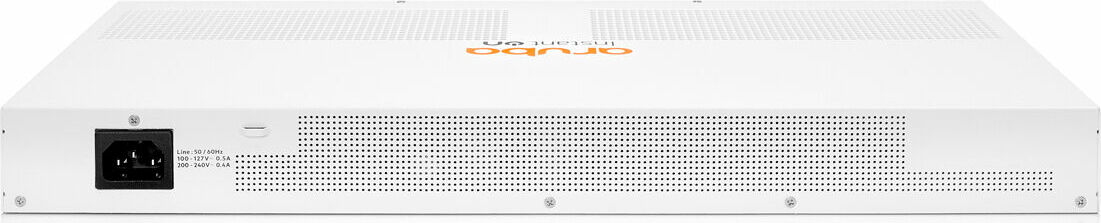
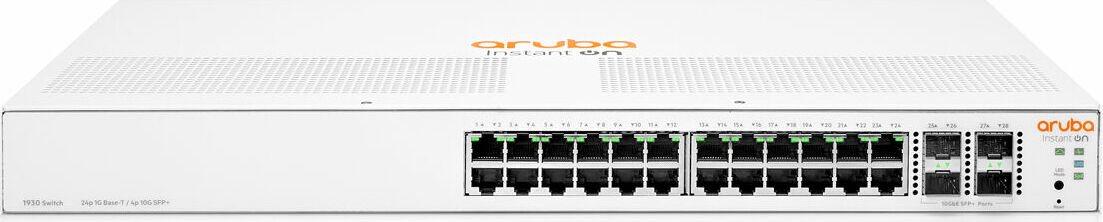
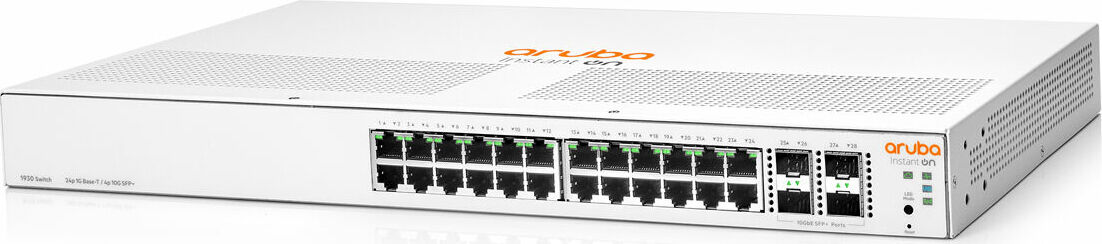
The HPE Aruba Instant On 1930 Rackmount Gigabit Smart Switch is a versatile, compact switch designed for small business networks. It provides 24 auto-sensing RJ-45 ports and 4 SFP/SFP+ uplink options, enabling straightforward deployment in racks or on flat surfaces. With PoE options on select models, cloud-based management, and a range of mounting configurations, it supports a scalable, secure network suitable for offices, retail, and collaborative workspaces.
Features and Key Benefits
- 24 Auto-sensing RJ-45 ports plus 4 SFP/SFP+ uplinks deliver flexible connectivity for devices, printers, and servers.
- PoE capability on specific models enables power delivery to IP phones and APs without extra cabling.
- Easy management via Web GUI and Aruba Instant On Cloud Portal or mobile app for iOS/Android, suitable for both local and cloud-based administration.
- Fan-free options on some models reduce noise, making them well-suited for office environments.
- VLAN support, up to 256 IEEE 802.1Q-compliant VLANs, and up to 16 trunks on larger switches to simplify network segmentation and bandwidth aggregation.
Design and Installation
- Rack-mountable and wall/under-table mounting options for versatile installation in small spaces.
- Auto MDI/MDI-X support and Energy Efficient Ethernet (EEE) help simplify cabling and reduce power consumption.
- SFP transceiver compatibility with Aruba-approved modules ensures reliable uplinks, with hot-swappable SFPs for minimal downtime.
- The switches are designed for indoor use and include mounting brackets and feet in the kit for flexible placement.
Management and Configuration
- Initial configuration is performed through a web browser or via the Aruba Instant On Cloud Portal; DHCP typically assigns an IP, with a fallback to 192.168.1.1 if needed.
- The device supports up to 256 VLANs and 16 trunks, enabling flexible network segmentation and higher aggregate bandwidth.
- Port LEDs provide live status for link, speed, and PoE, aiding quick diagnostics and maintenance.
Safety and Compliance
- Safety and regulatory information is included with the device; documentation emphasizes proper grounding, ventilation, and adherence to mounting guidelines.
- PoE certification ensures interoperability with compliant devices, reducing compatibility concerns in mixed-vendor environments.
Use Cases
- Small offices needing a reliable edge switch with simple cloud or local management.
- Environments requiring PoE for IP phones and wireless access points.
- Rack-mounted deployments in compact IT closets or small network rooms.
Notes
- Always use Aruba-approved transceivers and adhere to installation guidelines to maintain warranty and support.
- For full configuration details, consult the Aruba Instant On Switch Series Management and Configuration Guide.
Pros and Cons (summary)
- Pros: Flexible mounting options, cloud/local management, PoE on select models, SFP/SFP+ uplinks, VLAN scalability, energy efficiency.
- Cons: Some advanced features may require cloud management; ensure power budget matches PoE needs on PoE models.
3-5 Most Important Results
- Flexible deployment with rack, wall, or surface mounting options.
- Scalable port mix (24 RJ-45 + 4 SFP/SFP+), suitable for growing small networks.
- Cloud and local management choices for versatile administration.
- PoE capabilities on selected models support IP phones and APs.
- VLAN and trunking features enable segmented, high-bandwidth networks.
FAQ
- What mounting options are supported for the Aruba 1930 switches?
- The 1930 switches support rack, wall, under-table, and horizontal surface mounting, with brackets and feet included in the kit for versatile installation.
- Do all models support PoE?
- PoE is supported on specific 1930 models; check the exact model (e.g., 24G/48G PoE/Class 4 options) for available PoE power.
- How is the switch managed?
- Management is possible via a web browser interface and/or Aruba Instant On Cloud Portal; a mobile app is also available for iOS/Android.
- Can I hot-swap SFPs without powering down?
- Yes, SFPs are hot-swappable; however, rapid swaps are not recommended and should be followed by a brief initialization.
- What should I do if I forget the IP address or password?
- Restore to factory defaults using the Reset button workflow to regain access with the default IP 192.168.1.1 and default credentials, then reconfigure.
Search for 166 Manuals online


Type-in Brand or Model