
InLine Bluetooth Audio Transceiver Manual
PDF manual · 24 Pages
English



Ask a Question
Frequently Asked Questions
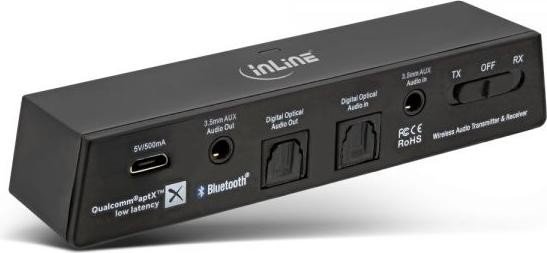
It supports TX (transmitter) mode to send audio from a TV or audio source to Bluetooth headphones or speakers, and RX (receiver) mode to receive Bluetooth audio from a phone, tablet or PC and output it to a stereo or active speakers.
Is this answer helpful?
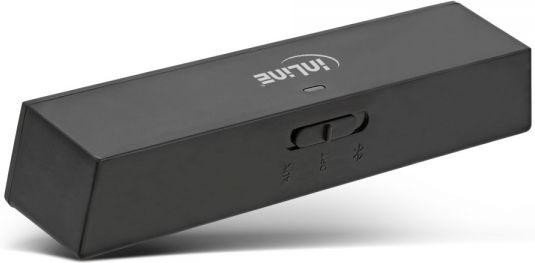
Power the transceiver, set the rear toggle to TX or RX, then slide and hold the multifunction switch to enter pairing mode (LED flashes red/blue or red/green). Put your Bluetooth device into pairing mode and select "InLine BT Transceiver" when scanning. The LED turns solid when paired.
Is this answer helpful?
Yes—when used with headphones or receivers that support aptX Low Latency, the transceiver minimizes delay (approximately ~40 ms latency). If the paired device doesn’t support aptX LL, streaming will use standard Bluetooth codecs with higher latency.
Is this answer helpful?
Check that the correct AUX/OPT input or output is selected, ensure cables are properly connected (inputs used in TX, outputs used in RX), verify device volumes and that the source is playing audio. For optical connections, ensure AUX is not also connected.
Is this answer helpful?
With the unit powered on, slide and hold the multifunction switch to the right for about six seconds until the LED flashes red/blue; this enters pairing mode and clears the transceiver’s paired device memory.
Is this answer helpful?
The transceiver requires 5V DC at 500 mA via the included micro‑USB cable. Use a USB power adapter or a powered USB port; an optional higher‑current adapter is available separately.
Is this answer helpful?
Clean with a dry, soft (velvety) cloth. Do not use detergents or liquids. Avoid exposing the device to moisture, direct sunlight, extreme temperatures or mechanical stress.
Is this answer helpful?
Advantages and Disadvantages
Advantages

- Dual TX/RX functionality for versatile use with TVs, stereos, phones and computers.
- Supports aptX and aptX Low Latency to minimize audio-video sync issues.
- Toslink optical and 3.5mm AUX input/output increases compatibility with many devices.
- Compact design with included cables and mounting accessories for easy setup.
- Multipoint streaming enables audio to two Bluetooth headphones simultaneously.
Disadvantages

- No onboard volume control — depends on connected device volume settings.
- Range limited to about 10 meters; performance can degrade with interference.
- Multipoint streaming may revert to standard Bluetooth if devices lack matching codecs.
- Requires external USB power (5V DC, 500mA) which may need a separate adapter.
- Not waterproof; must be used indoors and kept away from moisture and heat.
Product Description
InLine Bluetooth Audio Transceiver — Smart, Compact, and Versatile
The InLine Bluetooth Audio Transceiver is a compact dual-mode device that functions as both a transmitter (TX) and receiver (RX), enabling wireless Hi‑Fi audio streaming between TVs, music systems, smartphones, tablets, computers, Bluetooth headphones and speakers. Equipped with Bluetooth 4.1 and support for aptX and aptX Low Latency, it minimizes audio lag for better audio-video sync. The transceiver offers optical (Toslink) and 3.5mm AUX I/O, making it compatible with a wide range of audio sources and sinks.
Key features and usage
Setup is straightforward: mount the unit with the included sticky gel or Velcro, power via micro‑USB, and select TX or RX with the rear toggle. In TX mode it accepts audio from a TV or other device and streams to Bluetooth headphones or speakers; in RX mode it receives Bluetooth audio from a phone or PC and outputs to a stereo system. Pairing is done using the multifunction switch; the unit indicates status with a multi‑color LED. It supports multipoint streaming to pair two headsets simultaneously (note: aptX Low Latency benefits require both ends to support the codec).
The unit is passive with no built‑in volume control — volume is adjusted on connected devices. It stores paired devices and will attempt automatic reconnection when powered on. Factory reset and clearing of paired devices are performed by holding the multifunction button for several seconds as instructed.
Practical benefits
Small footprint and multiple cabling options (Toslink and 3.5mm with RCA adapter) make the transceiver ideal for living rooms, home theaters, and desktop setups. aptX and aptX Low Latency support reduce lip‑sync issues for gaming and video. Included cables and mounting accessories simplify installation.
Safety and care
Avoid exposure to moisture, extreme temperatures, and mechanical stress. Keep small parts away from children. Users with pacemakers should exercise caution due to wireless emissions. Clean with a dry, soft cloth; do not use detergents. Dispose of electronic waste according to local regulations.
Notes
- Best latency performance requires both transmitter and receiver to support aptX Low Latency.
- Ensure correct AUX/OPT selection depending on TX or RX mode.
- For multipoint streaming, if paired devices differ in codec support, streaming may fall back to standard Bluetooth audio.
Search for 166 Manuals online


Type-in Brand or Model