
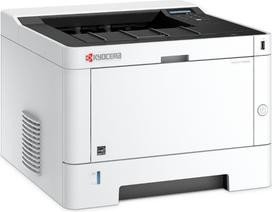
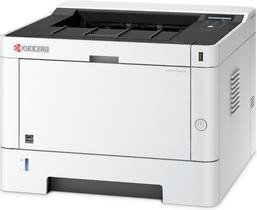
Kyocera Ecosys P2040dn, Laser, monochrome Manual
PDF manual · 242 Pages
English


Ask a Question
Frequently Asked Questions
The P2040dn is a monochrome laser printer that supports high-quality black-and-white printing with automatic duplex (two-sided) printing to reduce paper use. It’s optimized for office documents, drafts, and monochrome workflows.
Is this answer helpful?
Models equipped with Wi‑Fi support wireless LAN and Wi‑Fi Direct for direct device connections. For wired setups, the printer supports standard Ethernet interfaces with TCP/IP (IPv4/IPv6). Use the Wi‑Fi Setup Tool or configure network settings via the operation panel or Command Center RX.
Is this answer helpful?
Energy Saver and Auto Sleep modes lower power consumption when idle. EcoPrint reduces toner density for draft prints, and automatic duplexing cuts paper usage. ECOSYS long-life parts reduce waste and service frequency, supporting lower total cost of ownership.
Is this answer helpful?
The printer offers Private Print and job-box storage to hold print jobs until users release them at the device, preventing unattended output. Administrators can enable user/login accounting, restrict usage, and add card authentication via an optional kit for controlled access.
Is this answer helpful?
Drivers and software are provided (Windows and Mac installers), and administrators can use Command Center RX — a web-based interface — to remotely configure network, security, and device settings. Firmware and tools are available on the product DVD or Kyocera support site.
Is this answer helpful?
Routine maintenance includes replacing toner containers, clearing paper jams from indicated access points, and periodic internal cleaning. The guide details toner replacement, jam removal procedures, and maintenance menu functions to keep the device running smoothly.
Is this answer helpful?
Kyocera recommends genuine toner containers to maintain print quality and reliability. Use of non‑genuine supplies may cause failures and could void liability for resulting damages; genuine supplies include manufacturer labels and pass quality inspections.
Is this answer helpful?
Advantages and Disadvantages
Advantages

- Durable ECOSYS design with long-life components reduces maintenance frequency.
- Automatic duplexing and EcoPrint mode lower paper and toner consumption.
- Command Center RX remote management simplifies admin tasks and monitoring.
- Robust network support (IPv4/IPv6, TCP/IP) and Wi‑Fi Direct option for flexible setups.
- Security features include Private Print, job boxes, and optional card authentication.
Disadvantages

- Monochrome-only printing limits use for color-required materials.
- Advanced features (card readers, extra trays) require optional add-ons and cost.
- Small form factor means limited default paper capacity without optional feeders.
- Basic control panel and UI may feel limited compared with touchscreen competitors.
- Reliance on genuine Kyocera toner can increase consumable costs for some users.
Product Description
Kyocera Ecosys P2040dn — Reliable Monochrome Laser Printing
The Kyocera Ecosys P2040dn is a compact, dependable monochrome laser printer designed for small offices and workgroups that need consistent, high-speed black-and-white output with low running costs. Built around Kyocera’s ECOSYS philosophy, this model emphasizes long-life components, energy efficiency, and straightforward administration. It balances solid print performance with features that help reduce toner and paper consumption while offering practical network and security functions for everyday business use.
Key product highlights
The P2040dn delivers sharp monochrome prints and supports automatic duplexing to cut paper usage. Its design prioritizes durability — replaceable toner containers and a robust fusing system extend service intervals and minimize waste. Energy-saving modes reduce power draw during idle periods, and an EcoPrint mode lets users intentionally reduce toner density for draft or internal documents.
Networking is well supported: the unit connects via wired LAN (with full TCP/IP and IPv6 support) and, on Wi‑Fi–equipped variants, via wireless LAN and Wi‑Fi Direct for flexible installation without additional cabling. Administrators can remotely manage settings and monitor status through Command Center RX, simplifying deployment and maintenance across multiple machines.
Security and user control are practical features on the P2040dn. Private Print and job-box functions hold documents on the device until users release them, preventing uncollected sensitive output. Card authentication is supported via an optional reader kit, and administrators can enforce user/login accounting, set output restrictions, and configure access controls to limit usage and track consumption.
Operational convenience is emphasized with front-accessible cassettes and a multipurpose tray for envelopes and specialty media. The printer supports a variety of paper sizes and weights (including 64 g/m2 media) and can accommodate optional paper feeders to increase capacity. The control panel provides simple menu navigation for network, paper, and system settings, and built-in troubleshooting and maintenance guidance helps non-technical users handle routine tasks like toner replacement and paper jam clearance.
Practical use cases
This printer fits small office scenarios where monochrome output dominates—reports, invoices, contracts, and internal documents. It’s suited to environments that need reliable daily throughput with modest management overhead and where energy efficiency and consumable cost control are priorities.
Notes
- EcoPrint and duplex printing reduce toner and paper usage for drafts and internal materials.
- Command Center RX enables remote configuration and monitoring for administrators.
- Genuine Kyocera toner is recommended to preserve print quality and avoid damage.
Search for 166 Manuals online


Type-in Brand or Model