
Logitech Wireless Desktop MK235, USB, DE Manual
PDF manual · 21 Pages
English



Ask a Question
Frequently Asked Questions
The MK235 is designed for broad compatibility with common Windows and macOS setups via the USB receiver. Some features may require specific drivers or utilities; consult Logitech support for detailed compatibility notes.
Is this answer helpful?
Ensure the receiver is plugged in directly to a USB port near the keyboard and mouse, install fresh batteries if needed, and use the Reconnection Utility from Logitech's website to restore the wireless link.
Is this answer helpful?
Yes. Both keyboard and mouse have accessible battery compartments. Replace with the correct type as indicated in the manual to maintain wireless performance.
Is this answer helpful?
Yes. Fn with the specified keys provides quick access to Internet, Email, Calculator, and media controls, among others for convenient productivity and media management.
Is this answer helpful?
Warranty terms vary by region. Check locally for the specific coverage and duration, but Logitech products typically come with a standard regional warranty supporting defect-related claims.
Is this answer helpful?
Advantages and Disadvantages
Advantages

- Wireless convenience with USB nano-receiver
- Fn hotkeys for quick access to common tasks
- Integrated mouse with dedicated receiver storage
- Durable build suitable for everyday use
- Simple, plug-and-play setup
Disadvantages

- Basic feature set compared to premium models
- Battery dependence affects uninterrupted use
- Possible interference if USB hub is used
- Limited customization options
- Regional packaging may vary
Product Description
Logitech Wireless Desktop MK235 (DE) – Blog-Style Overview
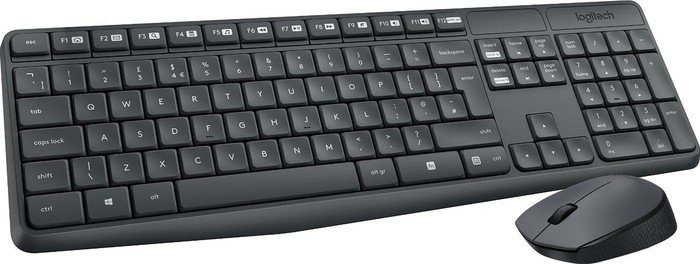
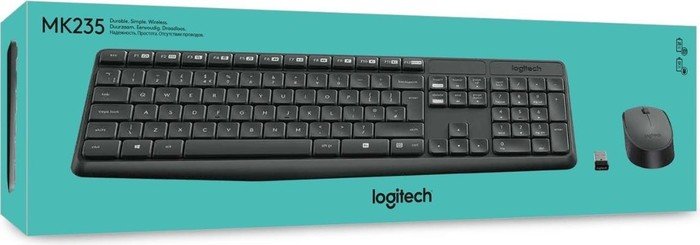
The Logitech Wireless Desktop MK235 combines a compact keyboard with a reliable wireless mouse, delivering a comfortable computing experience for everyday tasks. Designed with a focus on simplicity and practicality, this keyboard-mouse duo offers dependable wireless connectivity via a USB nano-receiver, letting you work from a distance without the clutter of cables. It’s tailored for German-speaking users (DE) and comes with a user-friendly setup that emphasizes quick installation and easy everyday use.
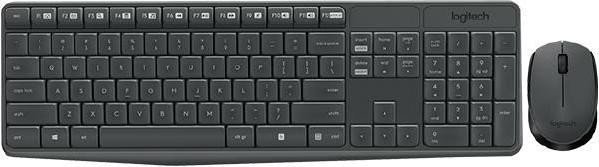
Physically, the MK235 duo features a standard keyboard layout and a comfortable mouse, both built to last with Logitech quality. The keyboard includes familiar hotkeys and Fn combinations that let you jump quickly to essential functions like Internet, Email, Calculator, and Media controls. The mouse provides responsive left/right buttons and a scroll wheel, with a dedicated storage slot for the USB receiver when not in use. The overall design focuses on reliability, comfortable typing, and smooth navigation for work, study, or casual browsing.
Connectivity is straightforward: plug the USB nano-receiver into your computer, and you’re ready to go. The setup guidance emphasizes keeping the receiver in direct line-of-sight, avoiding USB hubs when possible, and ensuring batteries are correctly oriented. If initial pairing hiccups occur, Logitech suggests a Reconnection Utility to restore the link, underscoring a frictionless user experience.
This entry highlights practical usage scenarios: home offices, classrooms, or shared device setups where a dependable wireless keyboard and mouse can streamline daily tasks. You gain a tidy desk, predictable performance, and the freedom to position your keyboard and mouse for optimal comfort. The MK235 is a sensible choice for those who value straightforward operation, durable materials, and a compact wireless solution that minimizes cable clutter without sacrificing productivity.
In summary, the Logitech Wireless Desktop MK235 (DE) offers an accessible, reliable wireless setup with essential hotkeys and durable components, ideal for everyday computing tasks. It’s a cost-effective option for users seeking convenience, quiet operation, and a cohesive keyboard-mouse pair that works well in a German-language environment.
Notes:
- Ensure batteries are installed correctly and the USB receiver is securely plugged in.
- If connection issues arise, use the Reconnection Utility from Logitech’s site as guided in the setup instructions.
- Multilingual product materials may be included, but core use remains straightforward for DE users.
Proses and Cons (key takeaways):
- Pros: Wireless convenience; reliable USB nano-receiver; hotkeys for quick access; durable build; integrated mouse with storage slot.
- Cons: Limited advanced customization; potential interference with USB hubs; basic feature set compared to premium models; requires batteries; may not include European power adapters in all regions.
FAQ:
- Q: Is the MK235 compatible with Windows and macOS? A: The MK235 is designed for broad compatibility and should work with common Windows and macOS setups via the USB receiver, though some features may be Windows/macOS-specific. For full functionality, ensure latest drivers or utilities are used.
- Q: How do I reconnect the wireless devices if they lose pairing? A: Use the Reconnection Utility from Logitech as described in the setup guide, and ensure the USB receiver is close to both keyboard and mouse, with batteries installed correctly.
- Q: Can I replace the batteries easily? A: Yes, both keyboard and mouse have accessible battery compartments and should be replaced as needed to maintain reliable wireless performance.
- Q: Does the keyboard have multimedia hotkeys? A: Yes, Fn + the corresponding key provides quick access to Internet, Email, Calculator, and media controls, among others.
- Q: Is there a guarantee of long-term reliability? A: Logitech products are built for daily use with a focus on durability; warranty terms vary by region, so check local coverage for specifics.
Search for 166 Manuals online


Type-in Brand or Model