
PreSonus Manuals
Manuals
Categories

PreSonus Manuals
Introduction
PreSonus manuals are comprehensive guides and documentation designed to help users get the most out of PreSonus audio hardware and software products. PreSonus, a leading manufacturer of professional audio equipment and music production software, provides detailed manuals that cover setup, operation, features, troubleshooting, and best practices for devices such as audio interfaces, mixers, digital consoles, MIDI controllers, studio monitors, and software like Studio One. These manuals serve beginners and experienced professionals alike, offering technical references, workflow guidance, and practical tips to optimize performance and creativity.
Purpose and Importance
PreSonus manuals exist to bridge the gap between product capabilities and user application. Rather than relying solely on trial-and-error, users can consult official documentation to understand intended workflows, safety guidelines, firmware updates, and compatibility information. For studios, live sound engineers, and home producers, accurate manuals reduce setup time, prevent equipment misuse, and ensure devices are configured correctly for specific tasks such as tracking, mixing, mastering, or live sound reinforcement.
Well-written manuals also document advanced features that may remain hidden without guided exploration, such as routing matrices, low-latency performance settings, automation workflows, and plugin integration. They form the authoritative source for troubleshooting steps and are often referenced when seeking community support, technical service, or warranty assistance.
Types of Manuals
PreSonus provides several types of manuals to accommodate diverse user needs:
- Quick Start Guides: Concise, step-by-step instructions to get a device operational quickly. These are ideal for users who need immediate results and a basic overview of setup and essential functions.
- User Manuals / Owner’s Manuals: In-depth documentation covering every feature, configuration option, and operation mode. These manuals often include diagrams, signal flow charts, and detailed parameter descriptions.
- Software Manuals: Dedicated guides for PreSonus software products, such as Studio One, Studio One Remote, and Universal Control. They cover installation, interface navigation, plugin usage, routing, MIDI mapping, and advanced production techniques.
- Reference Manuals: Technical documents aimed at power users and technicians, detailing signal paths, specifications, pinouts, and low-level configuration options.
- Firmware and Update Notes: Release notes and update documentation that detail changes, improvements, and bug fixes for hardware and software firmware updates.
Typical Structure and Content
A typical PreSonus manual is organized into logical sections with clear headings, diagrams, and stepwise procedures. Common sections include:
- Introduction and Safety: Overview of the product, intended use, and safety precautions.
- Getting Started: Unboxing, required accessories, initial connections, and first-run setup.
- Hardware Overview: Front and rear panel descriptions, I/O explanations, and physical features.
- Software Setup: Installation instructions, driver configuration, and DAW integration.
- Detailed Operation: In-depth walkthroughs of menus, controls, routing, and signal flow.
- Connectivity and Networking: Instructions for Dante, AVB, or Ethernet-based networking if applicable, including sample configurations.
- Troubleshooting: Common problems, diagnostic tips, LED indicator meanings, and recommended fixes.
- Specifications: Technical specs, power requirements, supported sample rates, and supported operating systems.
- Appendices: MIDI implementation charts, pinouts, regulatory statements, and licensing information.
Graphics such as block diagrams, screenshots, and flowcharts are often included to illustrate routing, workflow, and UI layouts. Tables summarize command lists, parameter ranges, and compatibility notes.
Accessibility and Formats
PreSonus manuals are typically offered in multiple formats to serve various user preferences and accessibility needs. These formats include downloadable PDFs from the PreSonus website, integrated help systems within software, and online knowledge base articles. PDFs are convenient for offline access and printing, while online documentation can be updated frequently to reflect firmware changes and new features.
Many manuals include searchable text, bookmarks, and clickable table of contents to facilitate quick navigation. For visually impaired users, PreSonus and community resources sometimes provide alternative formats or assistive guidance through video tutorials and step-by-step articles.
How to Use PreSonus Manuals Effectively
To get the most value from a PreSonus manual, follow these practical steps:
- Read the Quick Start or Getting Started section first to set up hardware and confirm basic operation.
- Use the Hardware Overview to identify connectors and signal paths before making physical connections.
- Consult the Software Setup section when installing drivers and integrating with your DAW to avoid latency or routing issues.
- Refer to the Detailed Operation and Routing sections while configuring complex signal chains or when using advanced features like virtual mixes, monitor control, or networked audio systems.
- Keep the Troubleshooting and LED Indicator lists handy for diagnosing common issues quickly.
- Check Firmware and Update Notes before upgrading device firmware to ensure compatibility and to learn about resolved issues or new features.
Additionally, supplement manuals with video tutorials, community forums, and PreSonus knowledge base articles for practical demonstrations and user-shared workflows.
Common User Topics Covered
PreSonus manuals frequently address the following user concerns:
- Latency and buffer size optimization for recording and monitoring
- Proper sample rate settings and clock synchronization when using multiple digital devices
- Gain staging and input/output level setting for optimal signal-to-noise ratio
- Routing audio to and from DAWs, analog outputs, and monitoring systems
- Using built-in DSP features such as reverbs, compressors, and channel strips when available
- Configuring monitor mixes, cue sends, and headphone outputs for performers
- Integrating with control surfaces, MIDI devices, and external DSP units
- Network audio configuration for Dante or AVB devices, including channel mapping and clocking
Examples of Products with Manuals
PreSonus manuals cover a wide range of products, for example:
- Studio One (software) — detailed user guide for DAW features, drag-and-drop workflows, mastering tools, virtual instruments, and mixing environments.
- PreSonus Audio Interfaces (e.g., AudioBox, Studio 24c, Studio 68c) — setup, driver installation, and I/O routing.
- StudioLive Mixers and Series III Consoles — channel processing, fat channel dynamics and EQ, virtual soundcheck, and AVB/Dante networking.
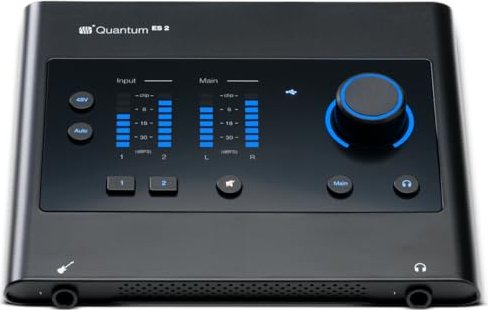
- Quantum Interfaces — low-latency driver setup and advanced routing for professional studios.
- Eris Studio Monitors — care, placement recommendations, and frequency response information.
Each product manual is tailored to the specific capabilities of the device and provides examples and recommended workflows relevant to typical use cases.
Troubleshooting and Support Features
Manuals typically include a troubleshooting section that lists observed symptoms, probable causes, and corrective actions. They often contain guidance on:
- Driver conflicts and installation errors
- No audio or one-sided audio problems
- Distorted signals and clipping prevention
- Issues with MIDI communication
- Network audio problems like channel dropouts or clock mismatches
For problems not resolved by the manual, PreSonus also maintains a support portal and community forums where official support staff and experienced users can offer help. Manuals usually link to these resources and describe how to collect system information for support tickets, such as serial numbers, firmware versions, and detailed reproduction steps.
Best Practices and Safety
PreSonus manuals emphasize best practices for audio fidelity and equipment safety. Typical recommendations include:
- Properly shutting down and disconnecting equipment to avoid power surges
- Using balanced connections and quality cables to reduce noise
- Observing recommended gain staging to protect speakers and ears
- Following ventilation and placement guidelines to prevent overheating
- Updating firmware only when following documented steps and backing up settings where applicable
Adhering to such guidance minimizes equipment damage risk and preserves long-term performance.
Community and Learning Resources
In addition to manuals, the PreSonus community provides tutorials, video demonstrations, and user-contributed tips that often expand on official documentation. Reading manual sections alongside video walkthroughs can accelerate learning, especially for visual learners and hands-on users. Many manual topics are also covered in specialized blog posts and webinars, providing real-world examples and advanced workflows.
Conclusion
PreSonus manuals are essential resources for anyone using PreSonus hardware and software. They provide structured, authoritative, and practical instructions that enable proper setup, efficient workflows, and effective troubleshooting. Whether you're a beginner setting up your first audio interface or a professional configuring a large networked audio system, the manuals offer step-by-step guidance and technical detail to maximize the potential of PreSonus products. Keeping manuals accessible, referring to update notes before firmware upgrades, and leveraging community resources alongside official documentation ensures a smoother and more productive audio production experience.
Search for 166 Manuals online


Type-in Brand or Model