
StarTech Multi-Slot-Cardreader, USB-A 3.0 [Plug] Manual
PDF manual · 2 Pages
English



Ask a Question
Frequently Asked Questions
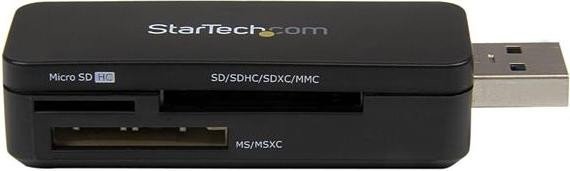
The reader supports a wide range of formats: Secure Digital (SD), SDHC, SDXC, Mini-SD, Micro-SD (T-Flash), MultiMedia Card (MMC), RS-MMC, Memory Stick, Memory Stick PRO/DUO, Memory Stick XC, Micro-MS (M2), and several MMC variants.
Is this answer helpful?
Yes. The device is plug-and-play on Windows (XP through 8 noted in the manual), macOS, and Linux. The host should automatically detect and install drivers; for newer OS versions, visit startech.com/downloads for the latest drivers if needed.
Is this answer helpful?
The interface supports up to 5 Gbit/s theoretical transfer rate (USB 3.0). Actual speeds depend on the memory card class, card performance, host port bandwidth, and system overhead; lower speeds are common with older cards or USB 2.0 ports.
Is this answer helpful?
On Windows use the Safely Remove Hardware icon and stop the USB Mass Storage Device before unplugging. On macOS drag the drive icon to the Trash or use Finder’s eject function. Improper removal can cause data loss or damage.
Is this answer helpful?
StarTech offers a two-year warranty covering defects in materials and workmanship and lifetime technical support. Warranty excludes damage from misuse, abuse, alteration, or normal wear. For support and downloads visit startech.com/support and startech.com/downloads.
Is this answer helpful?
If interference occurs, try reorienting or relocating the receiving antenna, increasing separation between devices, connecting to a different circuit, or consulting a radio/TV technician. These steps follow FCC guidance in the manual.
Is this answer helpful?
Advantages and Disadvantages
Advantages

- Broad card format support including SD, microSD, MMC, and Memory Stick families.
- USB 3.0 interface with up to 5 Gbit/s theoretical transfer rate for fast file access.
- Plug-and-play compatibility across Windows, macOS, and Linux systems.
- Compact single-connector design for easy portable use and quick setup.
- Backed by StarTech lifetime technical support and a two-year warranty.
Disadvantages

- Single USB-A connector requires an available USB 3.0 port; may need adapter for newer hosts.
- Real-world transfer speeds can be limited by card type, host port, and chipset overhead.
- Manual-era OS support list focuses on older Windows versions; newer OS specifics may need checking online.
- Warranty excludes damage from misuse, alteration, or normal wear and tear.
- No integrated cable management or protective cap—device is exposed when plugged in.
Product Description
StarTech Multi-Slot-Cardreader, USB-A 3.0 [Plug] Manual
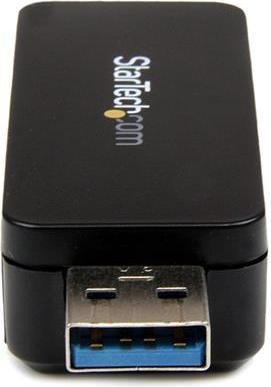
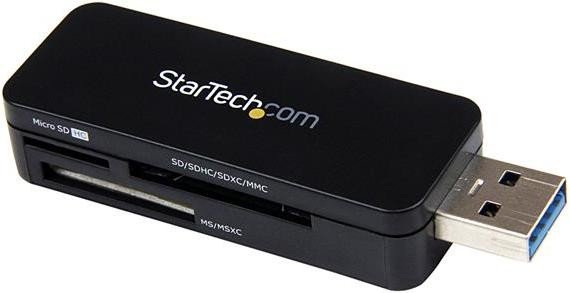
The StarTech Multi-Slot-Cardreader, USB-A 3.0 [Plug] is a compact, high-speed solution for reading a wide range of memory card formats through a single USB 3.0 Type-A connection. Designed for photographers, content creators, and everyday users who need quick access to SD, microSD, Memory Stick and other legacy formats, this reader offers plug-and-play convenience with backward compatibility for USB 2.0.
Featuring a Realtek RTS5307 chipset and a maximum theoretical transfer rate of 5 Gbit/s, the card reader supports SD, SDHC, SDXC, MMC, Mini-SD, Micro-SD (including T-Flash), RS-MMC, Memory Stick, Memory Stick PRO/DUO, M2 and other variants. The form-factor is straightforward: a single USB-A male connector that inserts into an available USB 3.0 port on the host computer. The operating systems supported include Windows (XP through 8), macOS and Linux, making it a versatile accessory across platforms.
Installation is simple. With the host powered on, plug the device into a USB 3.0 port and the system will automatically detect and install drivers. Windows users can verify installation via Device Manager under Disk Drives; macOS users can check the System Profiler under USB listings. For reliable data integrity, the manual emphasizes using the operating system’s safe removal procedures—Safely Remove Hardware in Windows or ejecting the drive on macOS—to prevent data loss or device damage.
The product package typically includes the USB 3.0 Multi Media Memory Card Reader Adapter and a brief instruction manual. StarTech offers lifetime technical support via their website and provides downloads and drivers as needed. The card reader is backed by a two-year warranty covering defects in materials and workmanship, excluding damage from misuse, alteration, or normal wear.
Regulatory compliance and legal notes are covered as well: the unit complies with FCC Class B limits and might require troubleshooting steps if it causes RF interference (reorient antenna, change outlet, consult technician). The manual also clarifies trademark references and limits StarTech’s liability to the purchase price of the product.
Notes
- Always eject cards using the OS safe removal method to avoid data loss.
- Visit startech.com/downloads for the latest drivers and startech.com/support for technical help.
- Warranty covers parts and labor for two years; misuse is excluded.
Search for 166 Manuals online


Type-in Brand or Model