

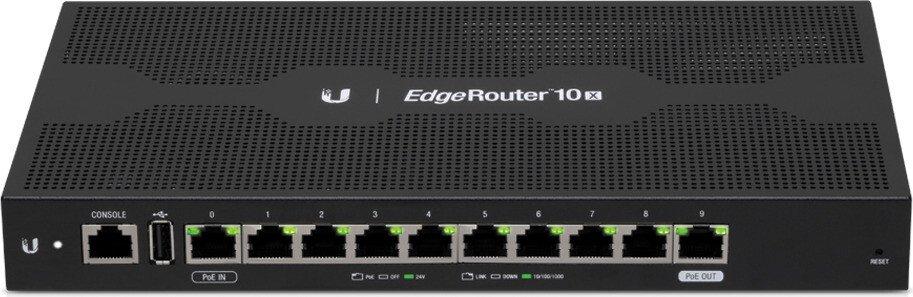

Ubiquiti EdgeRouter 10X Manual
PDF manual · 20 Pages
English



Ask a Question
Frequently Asked Questions
By default, eth0 is set to static IP 192.168.1.1. The default username and password are both ubnt. It’s strongly recommended to change credentials immediately after first login and to secure the management interface.
Is this answer helpful?
Port 0 supports 24V passive PoE input, and port 9 can supply passive PoE output (disabled by default). Configure PoE per-port via the EdgeOS Dashboard: Actions > PoE on the chosen port and confirm the device accepts passive PoE at the correct voltage.
Is this answer helpful?
Use the Reset button: runtime reset — with the router powered, hold Reset ~10 seconds until port 9 LED flashes then solid, then releases and router reboots. Power-on reset — hold Reset while connecting power until the port 9 LED flashes and then stops.
Is this answer helpful?
Yes. UNMS (Ubiquiti Network Management System) supports centralized configuration, monitoring, upgrades, and backups for multiple devices. Visit unms.com to set up centralized management and link your ER-10X.
Is this answer helpful?
Install indoors or house the unit in a protective enclosure if cabling is outdoors. Keep at least 20 mm clearance for ventilation, avoid exposure to moisture or storms, use shielded cable for outdoor runs, and ground the unit for ESD protection.
Is this answer helpful?
The ER-10X provides ten 10/100/1000 RJ45 ports only. For fiber links, use external media converters or switches with SFP ports; the router has no native SFP interfaces.
Is this answer helpful?
EdgeOS User Guide and firmware downloads are available at Ubiquiti’s support/download pages (ui.com/download/edgemax and help.ui.com). These resources cover advanced configuration, feature sets, and upgrade procedures.
Is this answer helpful?
Advantages and Disadvantages
Advantages

- Ten gigabit RJ45 ports with flexible port roles and PoE passthrough (port 0 PoE in, port 9 optional PoE out).
- EdgeOS with web GUI and UNMS support for centralized management, monitoring, and firmware backups.
- Compact metal enclosure with low power consumption (typical 8W) suitable for wall mounting or small installations.
- Strong hardware: dual-core 880 MHz MIPS CPU, 512 MB DDR3 memory, 512 MB NAND storage for routing and services.
- Clear front-panel status LEDs and console access for easy troubleshooting and recovery.
Disadvantages

- PoE output uses passive PoE; not compatible with active 802.3af/at devices without adapters.
- No built-in SFP ports — strictly RJ45 gigabit interfaces, limiting fiber connectivity without extras.
- PoE Out disabled by default and requires careful voltage checking to avoid damaging connected equipment.
- Commercial/Class A device may cause interference in residential environments and requires correct setup.
- Limited onboard serviceability; internal repairs require qualified technicians and compliance with warranty terms.
Product Description
Ubiquiti EdgeRouter 10X Manual — High-Performance Gigabit Routing
The Ubiquiti EdgeRouter 10X blends enterprise-grade routing performance with intuitive management for small offices, branch sites, and advanced home networks. Built on EdgeOS and powered by a dual-core MIPS 880 MHz processor with 512 MB DDR3 memory, the ER-10X delivers reliable gigabit routing across ten RJ45 ports, including PoE passthrough capabilities for flexible power topologies.
Compact and metal-housed, the ER-10X measures 268.1 x 136.5 x 31.1 mm and weighs roughly 600 g, making it suitable for rack or wall mounting with included hardware. Ports 0–9 support 10/100/1000 Mbps Ethernet, with port 0 accepting 24V passive PoE input and port 9 optionally providing passive PoE output (disabled by default). The device consumes minimal power (typical 8W) and operates from the included 24V, 1A external adapter. A front-panel console RJ45 and an accessible reset button allow direct CLI access and straightforward recovery to factory defaults when needed.
Installation is straightforward: use Category 5e or higher indoor cabling (shielded for outdoor runs), maintain ventilation clearance, and follow the mounting and grounding recommendations for safety and ESD protection. The front-panel LEDs provide clear status of system boot, UNMS connectivity, link/activity, and PoE state. EdgeRouter’s EdgeOS offers a web-based configuration interface (default static IP 192.168.1.1 on eth0 or DHCP on eth1) for rapid setup, while UNMS support enables centralized device monitoring, backups, and firmware management.
PoE passthrough support makes the ER-10X a convenient solution for powering downstream devices, but administrators must confirm passive PoE compatibility and configure PoE per-port settings via the Dashboard. The router also includes protections and compliance statements spanning FCC, CE, RoHS/WEEE, and international directives, making it appropriate for global deployments where commercial-grade networking equipment is required.
Whether you need a compact multiport gigabit router with flexible PoE handling or an EdgeOS-driven appliance that integrates into UNMS-managed estates, the ER-10X is a pragmatic choice for performance-focused small networks.
Notes
- Default login credentials: ubnt / ubnt; change immediately after first login.
- Maintain at least 20 mm clearance for ventilation to avoid overheating.
- Confirm passive PoE voltage compatibility before enabling PoE output.
Search for 166 Manuals online


Type-in Brand or Model