
Ubiquiti EdgeSwitch 10 XP Desktop Gigabit Managed Switch, 8x RJ-45, 2x SFP, PoE Manual
PDF manual · 23 Pages
English



Ask a Question
Frequently Asked Questions
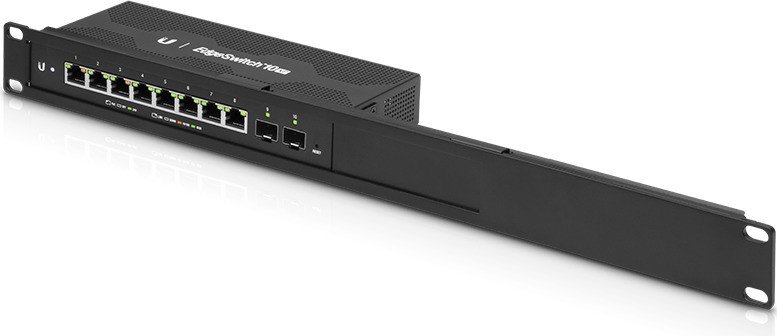
The ES-10XP provides eight 10/100/1000 Mbps RJ-45 ports with 24V passive PoE (pins 4,5+ and 7,8-) and two hot-swappable 1 Gbps SFP ports for fiber uplinks. PoE is off by default and can be enabled per port in the interface.
Is this answer helpful?
By default the switch uses DHCP. If DHCP is unavailable it falls back to 192.168.1.20. Log in via a web browser using the device IP, username ubnt and password ubnt, then change credentials and network settings in the System tab.
Is this answer helpful?
No. The ES-10XP uses 24V passive PoE, not standard 802.3af/at. Confirm that your powered devices support 24V passive PoE before enabling it to avoid damage.
Is this answer helpful?
Yes, but rack mounting requires the optional EdgeRouter Rackmount Kit (ER-RMKIT) sold separately. The unit includes screws and anchors for wall mounting and supports desk placement.
Is this answer helpful?
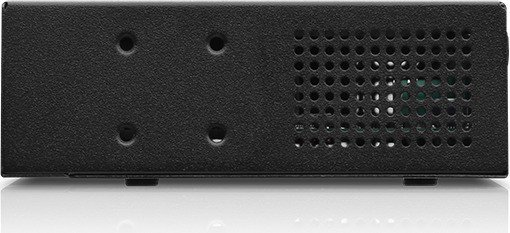
Maintain at least 20 mm clearance for ventilation, do not stack units, avoid exposure to moisture, and follow grounding instructions. Use the supplied power adapter and follow local electrical codes to reduce fire and shock risks.
Is this answer helpful?
Use the two SFP ports with appropriate fiber SFP modules to create 1 Gbps fiber links. Check Ubiquiti community resources for compatible module recommendations and distance specifications.
Is this answer helpful?
Yes. In addition to the local web interface, the switch can be managed via Ubiquiti’s UNMS/UISP platform for centralized configuration, monitoring, firmware upgrades, and backups.
Is this answer helpful?
Advantages and Disadvantages
Advantages

- Compact desktop/wall-mount design with 8 Gigabit RJ-45 ports and 2 hot-swappable 1 Gbps SFP slots.
- 24V passive PoE on ports 1–8 with up to 15W per port, useful for APs and cameras.
- Managed via web UI or UNMS/UISP for centralized configuration, monitoring, and firmware updates.
- Good switching capacity (20 Gbps) and forwarding rate (14.88 Mpps) for small networks.
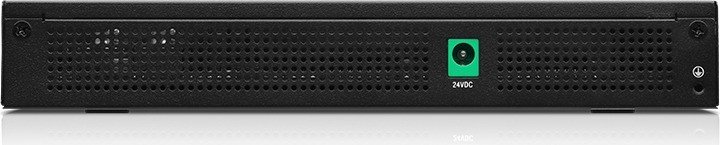
- Energy-efficient with modest power draw and included 24V/2.5A power adapter.
Disadvantages

- Uses 24V passive PoE (non-standard) — risk of compatibility issues with active PoE devices.
- Not rack-ready out of the box; rack mount kit sold separately for rack installations.
- Must keep 20 mm clearance for ventilation and cannot be stacked, limiting dense deployments.
- Basic web interface may lack advanced features found in higher-end enterprise switches.
- Passive PoE must be enabled per port manually to avoid damaging non-PoE equipment.
Product Description
Ubiquiti EdgeSwitch 10 XP Desktop Gigabit Managed Switch, 8x RJ-45, 2x SFP, PoE Manual
Overview
The Ubiquiti EdgeSwitch 10 XP is a compact, desktop-managed Gigabit switch designed for small offices, home labs, and edge deployments. It packs eight 10/100/1000 RJ-45 ports with 24V passive PoE capability and two hot-swappable 1 Gbps SFP slots into a slim, well-ventilated chassis. With a non-blocking throughput of 10 Gbps and a switching capacity of 20 Gbps, the ES-10XP delivers reliable wire-speed switching and simple PoE provisioning for powered devices such as access points and cameras.
Key Features and Design
Built for indoor use, the EdgeSwitch 10 XP supports Category 5 or better cabling and provides passive 24V PoE on ports 1–8, up to 15W per port. The front panel exposes clear status LEDs for system, per-port link/activity, speed, and PoE state. The two SFP bays enable fiber uplinks for extended reach or backbone connections. Management is accessible via the web-based EdgeSwitch Configuration Interface using DHCP by default, or by a fallback static IP (192.168.1.20). Ubiquiti’s UNMS (now UISP) is also supported for centralized configuration, monitoring, and firmware updates.
Installation and Practical Use
The compact unit can sit on a desk, be wall-mounted with included anchors and screws, or integrated into racks with separately sold kits. Clear ventilation rules and grounding options are emphasized: keep at least 20 mm clearance near vents, avoid stacking units, and attach an optional ground wire for enhanced ESD protection. Powering is via the included 24V, 2.5A adapter; PoE is disabled by default and must be enabled per port in the interface to prevent accidental damage to non‑PoE devices.
Performance and Safety
With a forwarding rate of 14.88 Mpps and a max non-PoE power draw of roughly 8W, the ES-10XP is energy-efficient yet capable of handling typical small-network loads. It includes ESD protection, complies with international safety and EMC standards (CE, FCC, ICES), and comes with Ubiquiti’s limited warranty. The manual highlights regulatory disposal (RoHS/WEEE) and regional compliance statements.
Final Thoughts
The EdgeSwitch 10 XP is a practical, affordable managed switch for edge deployments where a small footprint, PoE capability, and fiber uplink flexibility matter. It’s ideal for installers and small businesses seeking Ubiquiti’s management ecosystem and dependable wired performance without the complexity or cost of larger enterprise switches.
Notes
- PoE is 24V passive; verify connected devices support passive PoE before enabling.
- Default login is ubnt/ubnt; change credentials after first access.
- Keep ventilation clear and avoid stacking to prevent overheating.
Search for 166 Manuals online


Type-in Brand or Model