
Ubiquiti UniFiSwitch 8 Desktop Gigabit Managed Switch, 8x RJ-45, 60W PoE Manual
PDF manual · 24 Pages
English



Ask a Question
Frequently Asked Questions
Ports 5–8 are auto-sensing IEEE 802.3af PoE ports. Each port can provide up to 15.4W and the switch supports a total PoE budget of up to 60W from the external power adapter.
Is this answer helpful?
Install UniFi Controller v5.3.x or newer on a supported OS, ensure the switch is on the same Layer 2 network with DHCP, then open the Controller, go to Devices, locate the US-8-60W and click Adopt. The system LED will turn steady blue when adoption succeeds.
Is this answer helpful?
The US-8-60W must not be stacked and requires at least 20 mm of clearance next to ventilation holes. It can be placed on a desktop or mounted on a vertical surface using the included screws and anchors according to wall-mount instructions.
Is this answer helpful?
Check power connections and the power adapter, confirm uplink to a DHCP-enabled network, verify Ethernet cabling is CAT5 or better, and use the reset button for restart (quick press) or factory reset (hold >5s). Monitor LEDs for link/activity and PoE status.
Is this answer helpful?
The switch is grounded via the power adapter, but ancillary grounding is recommended for enhanced ESD protection. Loosen the ground screw, attach a ground wire (not included) to the grounding point, and connect the other end to a grounded structure or grounding block.
Is this answer helpful?
Use UniFi Controller v5.3.x or newer; the Controller runs on Linux, macOS, or Windows. Google Chrome is recommended for the management interface, as other browsers may offer limited functionality.
Is this answer helpful?
The US-8-60W includes a one-year limited warranty covering defects in materials and workmanship, with exclusions for misuse, unauthorized modifications, or third-party firmware. The device complies with CE, FCC, IC standards and RoHS/WEEE disposal rules.
Is this answer helpful?
Advantages and Disadvantages
Advantages

- Compact desktop form factor with optional wall-mounting for flexible placement.
- Four auto-sensing 802.3af PoE ports (5–8) delivering up to 15.4W per port.
- Non-blocking 8 Gbps switching capacity and gigabit ports for reliable throughput.
- Seamless integration with UniFi Controller for centralized management and monitoring.
- Clear LED indicators for system status, link speed, activity, and PoE state.
Disadvantages

- PoE budget limited to 60W total; not suitable for multiple high-power PoE devices.
- Requires UniFi Controller v5.3+ and Java; initial setup may be complex for beginners.
- No SFP ports or advanced layer-3 features—limited for larger or advanced networks.
- Must maintain ventilation clearance and cannot be stacked, limiting dense deployments.
- One-year limited warranty with exclusions for misuse, modifications, or third-party firmware.
Product Description
Ubiquiti UniFiSwitch 8 Desktop Gigabit Managed Switch, 8x RJ-45, 60W PoE Manual
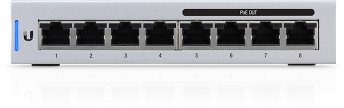
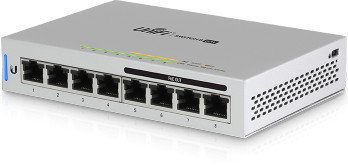
The Ubiquiti UniFiSwitch 8 (US-8-60W) is a compact, desktop-managed gigabit switch designed for small offices, home labs, and edge deployments. With eight 10/100/1000 RJ-45 ports and four ports (5–8) providing auto-sensing IEEE 802.3af PoE up to 15.4W per port, it supplies power and connectivity to access points, IP cameras, and VoIP phones while keeping a small footprint. Its non-blocking 8 Gbps switching capacity and ARM Cortex-A9 processor ensure reliable line-rate throughput and responsive management via the UniFi Controller.
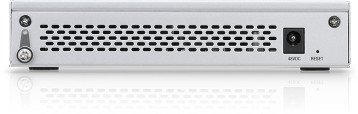
Physically the switch is lightweight and low-profile (148 x 99.5 x 30.7 mm, 432 g), suitable for desktop placement or wall mounting using included screws and anchors. The back panel offers a power input, an optional grounding point for enhanced ESD protection, and a reset button that supports quick restart and factory reset. Ventilation holes require at least 20 mm clearance and the unit must not be stacked to avoid overheating.
On the management side, the UniFiSwitch integrates with the UniFi Controller (v5.3.x or newer), which runs on Linux, macOS, or Windows and is best accessed via Google Chrome. Adoption in the Controller turns the system LED steady blue and unlocks features like monitoring, firmware updates, and device location functions. LEDs on each RJ45 port show link speed, activity and PoE status, while the system LED indicates initialization, adoption state, firmware upgrades, and locate commands.
Installation is straightforward: connect the included power adapter, plug a DHCP-enabled uplink to any port, and attach PoE devices to ports 5–8 for automatic power. Grounding via the ancillary ground point is recommended for improved protection. The package includes the switch, power adapter, power cord, mounting hardware, and a quick start guide.
Safety and compliance are emphasized: follow ventilation and grounding warnings, use CAT5 or better cabling, avoid exposure to moisture, and adhere to local regulations. The product carries CE, FCC, and IC certifications, meets RoHS/WEEE disposal requirements, and is covered by a one-year limited warranty with terms that exclude damage from misuse, unauthorized modifications, or third-party firmware.
Notes:
- Ports 5–8 supply PoE (802.3af) automatically up to 15.4W per port.
- Use UniFi Controller v5.3.x or newer for full feature access and adoption.
- Maintain at least 20 mm clearance for ventilation; do not stack the unit.
- Grounding via the ancillary point enhances ESD protection.
Search for 166 Manuals online


Type-in Brand or Model